Attach evidence
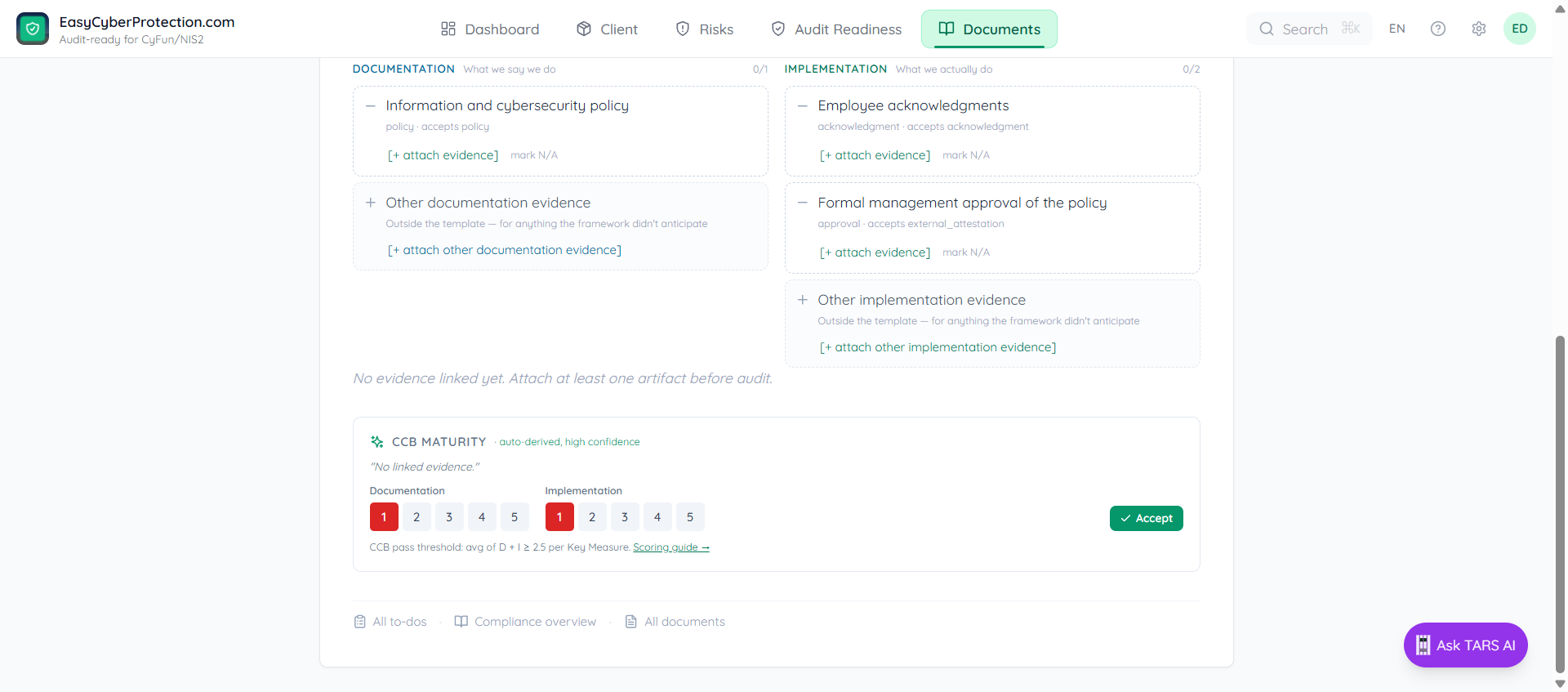
Every control splits its requirements into documentation (what we say we do) and implementation (what we actually do). You attach typed artifacts per requirement — the auditor checks both sides, and so does ECP.
Two sides of every control
- Documentation — policies, procedures, approvals, written standards. The paper story.
- Implementation — logs, config snapshots, training records, acknowledgments, test results. The evidence that the paper story is real.
A CyFun audit needs both. A policy without logs is theatre; logs without a policy is anecdote.
Where to start
Open any control from Audit Readiness and click Upload evidence, or navigate to the control page directly under Documents → controls → cyfun-basic → ….
The Evidence section splits into two columns. Each column lists the template requirements the framework expects for that control, with a live counter (e.g. Documentation 0/1, Implementation 0/2) and an [+ attach evidence] button per requirement.
Attach a typed artifact
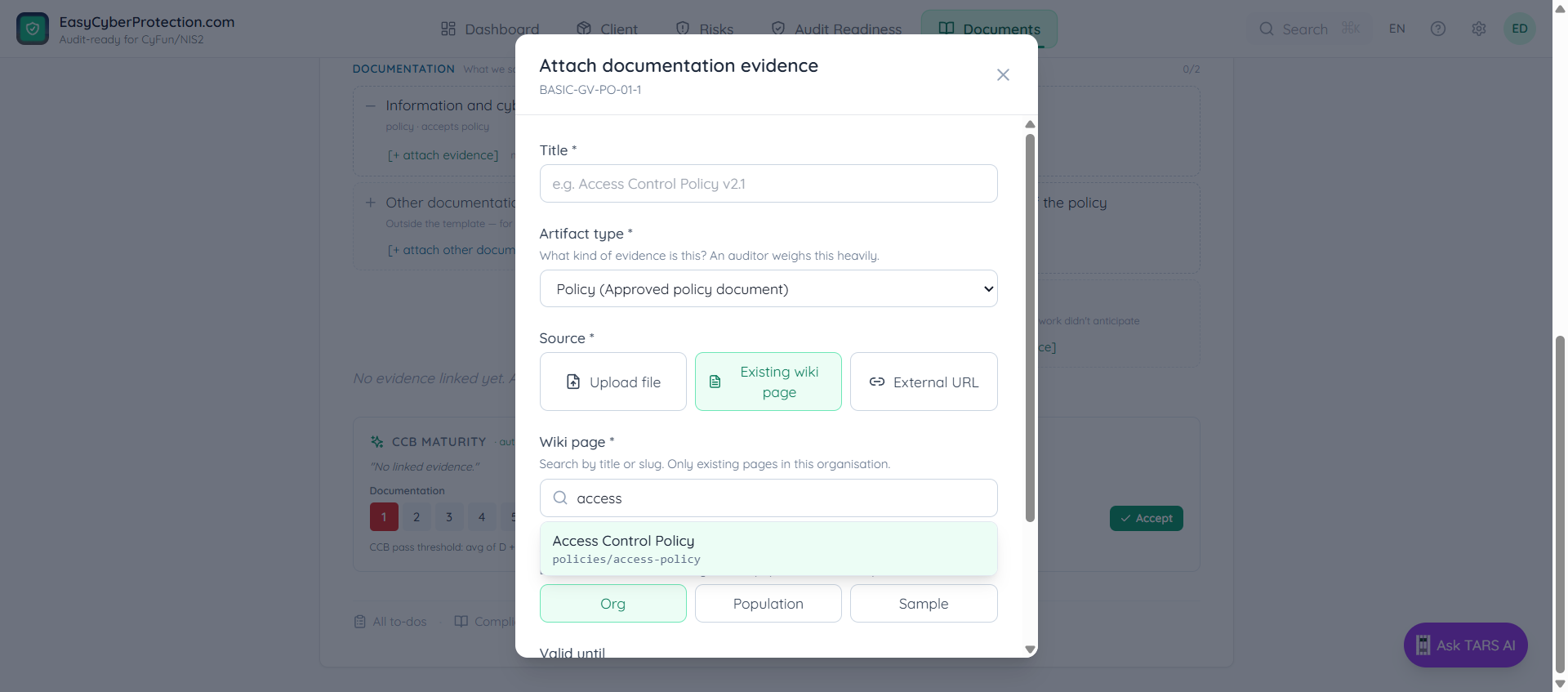
Click [+ attach evidence] next to a requirement. The picker is already filtered to the artifact type that requirement accepts — you cannot accidentally attach a training record as a policy. Pick from three sources:
| Source | When to use |
|---|---|
| Existing wiki page | Policies, procedures, registers and other documents already in ECP — the most common source once onboarding is done. |
| Upload file | PDFs, screenshots, exported reports — anything that lives outside the wiki. |
| External URL | A link to an external system (SharePoint, Jira ticket, Intune policy) the auditor can click through to. |
Mark N/A with justification
Some requirements genuinely don't apply. If the organisation runs no servers on-premise, a physical access log for the server room is moot. Click mark N/A next to the requirement and enter a short justification.
N/A requirements drop out of the Audit Readiness counts and are surfaced separately on the CCB export, so an auditor can spot-check the justification. Do not mark N/A to hide gaps — auditors routinely challenge lazy justifications.
The "Other" row
Each column ends with [+ attach other documentation/implementation evidence]. Use this when your evidence is relevant to the control but doesn't match any of the template requirements — for example, an ISO 27001 internal-audit report that covers information-security policy but was not anticipated by the CyFun template.
Other-row artifacts count toward the control's evidence, but do not close specific template requirements. The Audit Readiness panel shows them separately.
Scope and validity
When you attach, ECP infers scope and validity where it can (an M365 Graph sync stamps both automatically). For manual artifacts you'll be asked for:
- Scope — whole organisation, a declared population (e.g. all devices), or a representative sample
- Valid until — after this date Audit Readiness flags the artifact as stale, and the control starts failing again
Stale evidence is the #1 real cause of CAB audit findings. Set realistic expiry dates (6 months for logs, 12 months for policies) and re-attach fresh copies on time.
What happens after you attach
- The requirement row flips to a filled state — counter moves from 0/1 to 1/1
- Audit Readiness recomputes the bucket for this control — usually from Will-fail to Ready once every required requirement is covered
- ECP re-derives the CCB maturity scores (D and I). Click Accept on the control row to lock them in, or override manually
- Your readiness percentage updates immediately — no rebuild, no page refresh